
Git is one of the most common tools used by anyone working with code for version management, and storage of their applications. A common downside however, is people have a tendency to include things in Git commits that they shouldn’t, such as secrets. Now for both attackers and defenders, plenty of tools exist to scan repositories for secrets and report them. However, it can be of a pain to manage the output, especially during Red Team operations where collaboration is important.
In this post we will explore more about Git, Git hosts such as GitHub, how to find secrets, and ideas for defenders to help deal with this issue. I have also released a tool, GitMortem, to aid in the analysis of repositories, which is available at https://github.com/Jack-Barradell/GitMortem.
What is Git?
Before we dive into finding secrets, first we have to understand what Git is, and at least some of how it works.
Git is a version control system, primarily for code, and operates via storing code within “repositories”, these then contain “commits”, representing the state of the code at a given time. Repositories also contain “branches”, each branch can contain the same, or differing, sequences of commits, and be merged into each other to combine work. Allowing collaborative work, experimentation and independent development of specific features. Users can freely switch between branches and commits, to view or work on the repository in any of its historic states.
Git does not inherently provide a server or centralised system for sharing repositories, instead it provides the ability to link repositories to a “remote” which can provide these services. Various platforms exist which act as central hosts for repositories which users can use to maintain an authoritative version. Examples of these services include GitHub, GitLab and Bitbucket, with self-hosted options also available. Importantly, these services are heavily used by developers within organisations, often hosting large quantities of repositories, with commits from multiple developers.
Finding Secrets in Git
As Git allows committing of files across various states, it is not uncommon for developers to inadvertently include files that contain secret values, such as passwords, API keys and other credentials. Most organisations will have policies (and hopefully, protections) against this, however, it still commonly happens.
A common pitfall here is a developer notices a secret has been committed to a repository, so issues a new commit to remove it. But, the secret will remain within the repositories history, and be retrievable by viewing the repository state at relevant commit points.
Attackers that gain access to repositories (or access public repositories) may seek out secrets that have been committed, and use them to attempt access to other resources, such as cloud providers (e.g. AWS, Azure) potentially allowing a pivot from access to systems like GitHub, to entirely different service, often with un-related privileges or user identifiers. This can prove incredibly difficult for defenders for identify, as the correlation of logs between services such has GitHub, and where the credentials may be usable, is often minimal.
To identify secrets, many tools exist, good examples include:
GitMortem
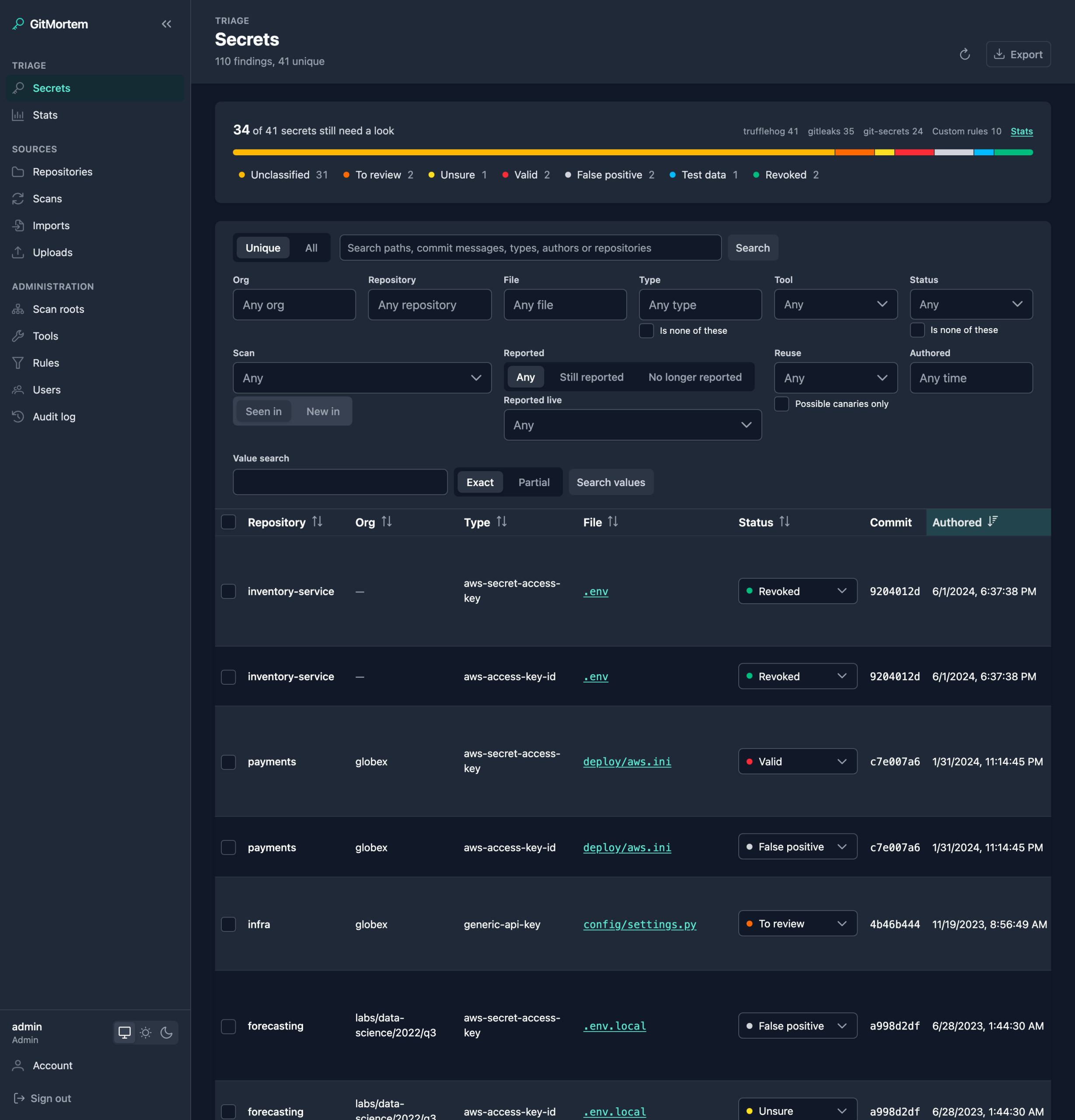
Now while the tools referenced above are great at finding the secrets, I personally have found them awkward in practice, as managing their output, marking things as valid, invalid, false positive, expired, etc, know what i’ve tried, when I tried it, and exploring the repository to find the context all required a lot of manual tracking and other tools. Therefore, I built GitMortem, as Python based web application which wraps scanning tools, and imports their results to a central point, with built-in features such as tagging secrets, repository exploring, and search. The application can be run locally, or setup for multi-user use on a server, allowing multiple operators to review the same repositories.
The tool can be found here https://github.com/Jack-Barradell/GitMortem
For Defenders
So we’ve explored why, and how, and attacker may review repositories for secrets, but what can defenders do about it?
Prevent
- Make use of service-side push protection secret scanning on your Git service, such as GitHub and GitLab
- Use pre-commit hooks attached to scanning tools to automatically reject commits containing secrets
- Educate users on the risks of secrets being committed
- Ensure reviewers of pull-requests are trained to identify and report secrets in commits
Detect
- Regularly scan your own repositories and ensure any secrets are rotated, and removed from repositories (including histories!)
- Add detections within your CI/CD pipelines
Common Mistakes
When trying to defend against leaked secrets, there are some common issues with the approach:
- Not checking histories only newest commits
- Not rotating, only removing from repo
- Removing secrets from files but not clearing them from historic commits
- Missing secrets that are encoded
- Encrypted secrets, but the decryption key is also in an accessible repository
Similar Issues
This same issue come up in lots of other places, such as:
- Network shares
- SharePoint/Google Drive
- Emails and Messages
Therefore it is critical when devising strategies to deal with this issue, you must consider other places in which secrets may be exposed, and ensure you have prevention and detections in place for those as well.